Hospital Alert
International social IT project

Hospital Alert

A free software system for hospitals worldwide — to call medical staff.

Instead of wired hardware costing millions. A patient asks for help — the nurse gets it in a second. Any phone, any hospital.

Hospital Alert
$0for hospitals
12languages
~1scall delivery
24/7auto-escalation
Video presentation — 1 minute

Help is one tap away

The patient scans the QR code in the room — and the button to call the staff is already on their phone. No wires, no expensive equipment.

  • One tap calls for help — then explain by voice or text what happened
  • The call reaches the nurse station and the ward nurses' app
  • Everyone speaks their own language — messages are translated automatically
  • The patient sees the call is accepted; the nurse quickly calls the doctor and colleagues
  • The whole team stays connected — with each other and with patients
In brief

Six reasons it works

The short version first — full details and every feature below.

Free forever

Wired systems cost millions per floor. Ours is free, no limits.

Auto-escalation

No answer — it escalates to the on-call doctor, then the head nurse.

12 languages

On-the-fly translation between patient and staff — voice and text.

QR access

The patient scans the QR on the wall and calls instantly. No install.

Accessibility

Calm mode without sirens, pictograms, pain scale, large buttons.

Privacy

No medical data stored. Anonymous nicknames. Data isolation between hospitals.

Live demo

Press the button — see how it works

Patient in the room
CALL
↑ tap it
Nurse station
Active calls
✓ No active calls
Room 412 URGENT
Pain · just now · awaiting response
In depth

Built to save lives

The patient calls with one touch

Large clear buttons, a reason pictogram, a pain scale. Designed for the elderly, the visually impaired, and people who share no language with staff.

  • Emergency & normal buttons + 9 call reasons
  • Pain scale and a 3-second cancel window
  • Calm mode without sirens, and pictogram-only mode

The station sees rooms and calls in real time

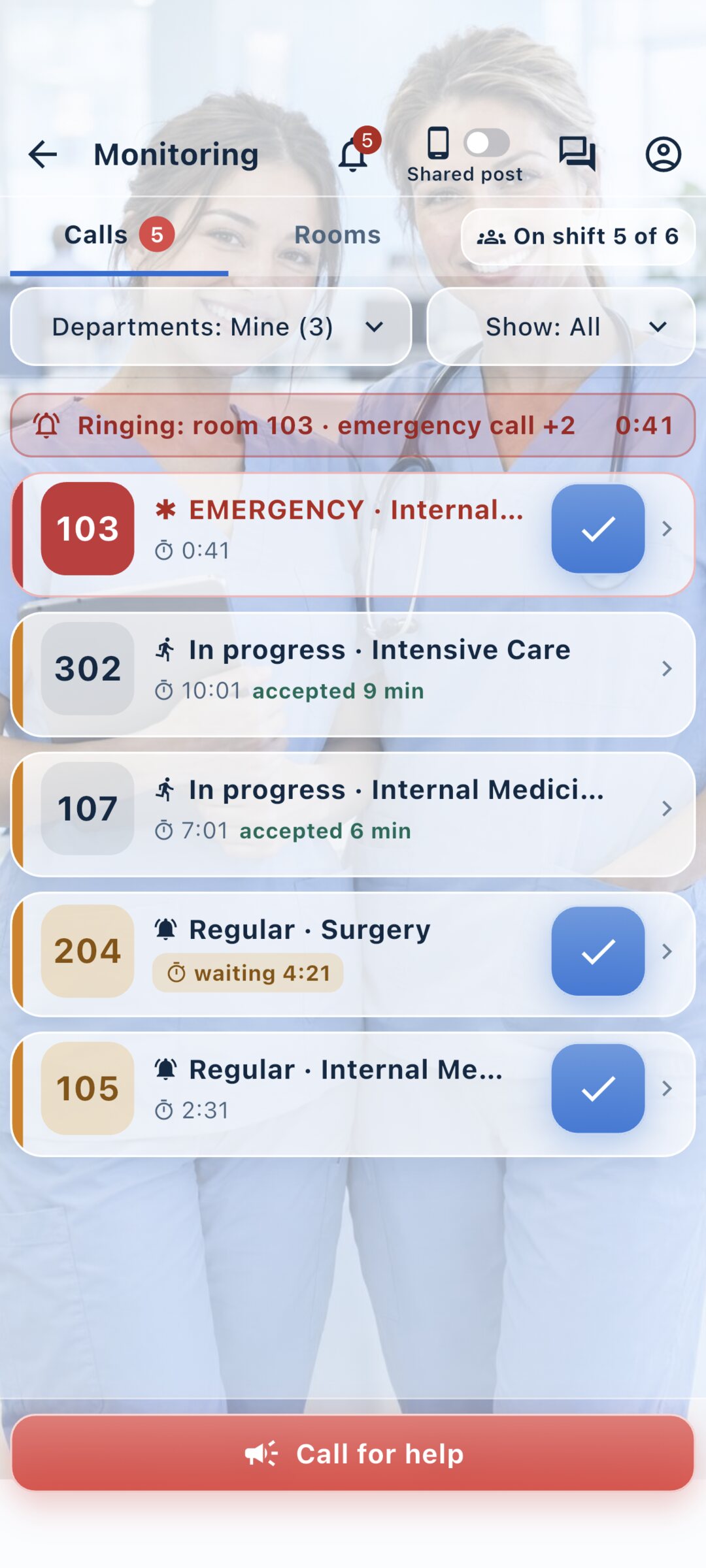
A room panel shows every room's status as a grid (connected / call / emergency), while a prioritized live call feed updates every second. Sound and vibration on a new call. Accept — complete — chat with the patient.

  • Accept & Done buttons, sound + vibration
  • Department switcher and a personal on-shift profile
  • Patient chat and quick canned replies

Translation removes the language barrier

Voice and text are translated between patient and staff on the fly. Essential for foreigners and multinational hospitals.

  • Speech capture & recognition, translation, text-to-speech
  • Ready-made canned replies — 12 languages

No one is left unanswered

If a nurse doesn't answer within the set time, the call is auto-escalated: to the on-call doctor, then the head nurse. Roles are flexible, including custom ones.

  • Time-based auto-escalation, 24/7
  • Roles: nurse, head nurse, on-call doctor, doctor, custom
  • Staff chats: groups, DMs, reactions, search
Full list

Every feature — by role

Everything that already works in the app today.

Patient

  • Emergency and normal nurse-call buttons
  • 9 reason pictograms: water, pain, bathroom, food, meds, etc.
  • Smart taps: 1 tap — normal, 3 — urgent, hold — critical call (highest priority)
  • 3-sec cancel window — protects against accidental calls
  • Discomfort scale with pictograms (6 faces)
  • Live call status (sent → accepted → done)
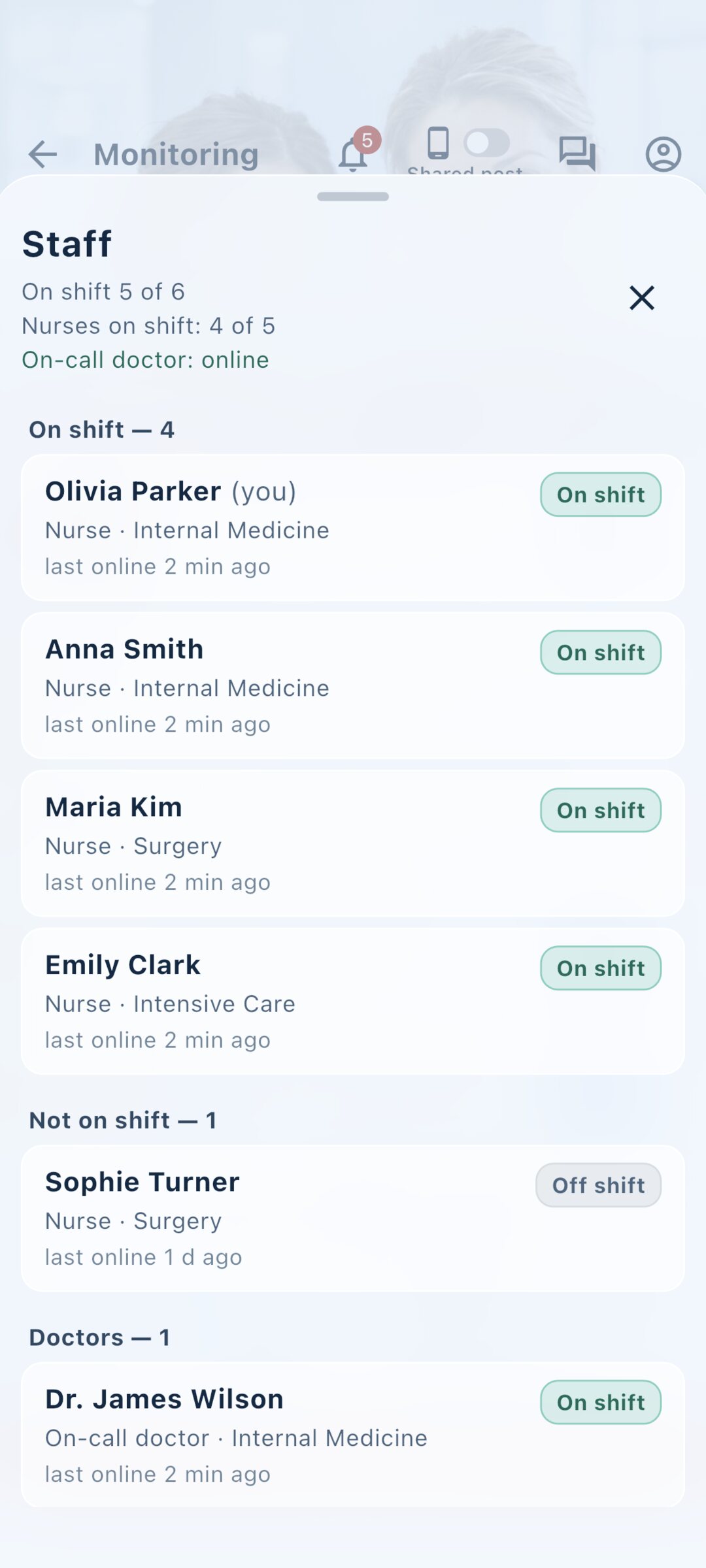
  • Shows how many nurses are on shift right now
  • Calm mode and pictogram-only mode
  • QR entry from the wall or manual room code
  • Comment on the alert — text or voice; the nurse replies in the same card
  • A “Question (non-urgent)” button — a calm channel, separate from alerts
  • Web push to the patient — the nurse's reply arrives even if the tab is closed

Station & nurse

  • Ward overview panel — a grid of all rooms, colour = status (connected / call / emergency), with a live call feed beside it
  • A “Questions (non-urgent)” tab — non-urgent requests kept apart from alerts
  • Prioritized live call feed, ~1s refresh
  • “Call for help” — instant alert to colleagues with a severity level (voice/text)
  • Full-screen alarm wakes the phone even with the screen off — bypasses Do Not Disturb
  • Accept & Done, sound + vibration on new calls
  • Department switcher for multi-ward staff
  • Personal profile: nickname, wards, on-shift toggle, sound/vibration
  • “On shift / Off shift” at the top: off shift, calls don’t come to this phone
  • When you leave your shift, you can return accepted calls to the department
  • A ringtone for each alert type — from the set or your own file
  • Alarm check (Android): a test alarm plus warnings about alarm volume and battery saving
  • When a new version is out, a reminder to update appears at the top — it doesn’t block work
  • Patient chat (text + voice) and canned replies

Voice & translation

  • On-device speech capture & recognition
  • Translation of voice and text between patient and staff
  • Text-to-speech — listen to any message
  • Canned replies in 12 languages

Staff chats

  • Groups and DMs, member management
  • Replies, emoji reactions, mute, search

Administrator

  • Create a hospital via Google Maps or manually
  • Departments and rooms — bulk creation by range
  • Codes and QR in two modes: a per-room code, or one department code + room number
  • Printable sheets (PDF) — branded: a per-room QR sheet or a department sheet with instructions
  • Custom roles with configurable call routing
  • Admin can also work as an operator — opens the call monitor and accepts calls
  • Escalation setup: who is alerted and after how long — by severity and an auto-chain
  • Staff list: who is on shift and who has an old app version
  • Staff invitation as a large QR code — share, download or print

Security

  • Data isolation between hospitals
  • No medical data stored, anonymous nicknames

Now live

The app is available on Android (Google Play), iOS (App Store) and on the web. Push notifications wake the phone even in sleep mode — the alarm gets through even when the screen is off. Patients receive the nurse's reply by web push too — even with the tab closed.

Administrator guide

Deploy in minutes, not months

Step by step — what to open and what to enter. No hardware, just smartphones.

1

Install the app

Download from Google Play or the App Store, or open the web version on any device.

2

Register the hospital

On the first screen, tap “Register a hospital”, then find your hospital on Google Maps or enter the details manually.

3

Create the administrator login

A login and password — no email. Save the recovery codes: they let you set a new password if you forget the old one.

4

Add departments and rooms

E.g. Therapy, Surgery. Rooms are created in bulk by range (101–120).

5

Get codes and QR

The system issues a hospital code, department codes (for staff) and room QR codes (for patients).

6

Place and hand out

Print the room QR codes and put them by the beds. Give department codes to the staff.

7

Done — the system is live

Staff join with a code, patients call via QR. Deployment complete.

Staff guide

  1. Open the app → “I'm staff”.
  2. Sign up or sign in.
  3. Enter the 9-digit department code or scan a QR.
  4. In your profile, turn on the On-shift toggle.
  5. Take calls and chat with the patient.

Patient guide

  1. Scan the QR on the ward wall (or enter the code manually).
  2. Press the call button and pick a reason.
  3. For emergencies — hold the button.
  4. The nurse gets it instantly; you can text and talk.
How it works

Clear from the first tap

Patient

Scans the QR at the bedside or enters a room code — no app install. Instantly sees their room and two big buttons: URGENT (critical call) and CALL (regular help). Can specify what they need: water, pain, bathroom, food, medicine, cold…

Patient screen — room and call buttons What the patient can request After the call — “Nurse is on the way”, you see who accepted

Nurse & staff

Picks a role and signs in with a login and password — no full name or email. Accounts are issued by the hospital admin, so personal data stays protected. Then the station opens: every room colour-coded by status and live calls.

First screen — “I'm a patient”, “I'm staff” or “Register a hospital” Staff sign in — no personal data Nurse station — rooms colour-coded: emergency, regular, connected Call feed — emergencies first, you see who accepted Who is on shift — the station's staff list

Administrator

Registers the hospital and gets a sign-in code. In “Staff” they create personnel accounts — just a login, a pseudonym and a role, no full name or email. Every room gets its own code and QR: print it, stick it by the bed — the patient scans and instantly calls for help.

Admin dashboard — hospital code and menu Staff — who is on shift and who runs an old app version Departments and rooms — each has its own code and QR
Free for hospitals

Bring it to your hospital

Download the app or open the web version. We'll help you deploy and answer questions.

Scan a QR code with your phone camera or tap a button

Have an idea or found a problem? Request a feature · Report a problem — or message us in the chat at the bottom right.

A social project

Help the project

Hospital Alert is free and non-commercial. We keep the systems running worldwide by our own efforts. If the idea resonates — we welcome like-minded people.