About the project
Try Hospital Alert in one department: a free pilot checklist
To try Hospital Alert, start with one department: the administrator registers the hospital in the app, creates the department and its rooms, prints a QR sheet for each room, invites the nurses and decides who gets alerted if nobody accepts a call. Then run test calls from every room with the staff, and keep your usual way of calling for help in place during the pilot.

Who this page is for
For a head nurse, a department head or the person who looks after IT in a hospital, clinic or care home. Hospital Alert is free for hospitals today, so the simplest way to decide is to try it in one department for a week and keep your usual way of calling for help in place.
Six steps in one department
- Register the hospital. Install the app or open the web version, choose your hospital and create the administrator's login and password — no e-mail needed.
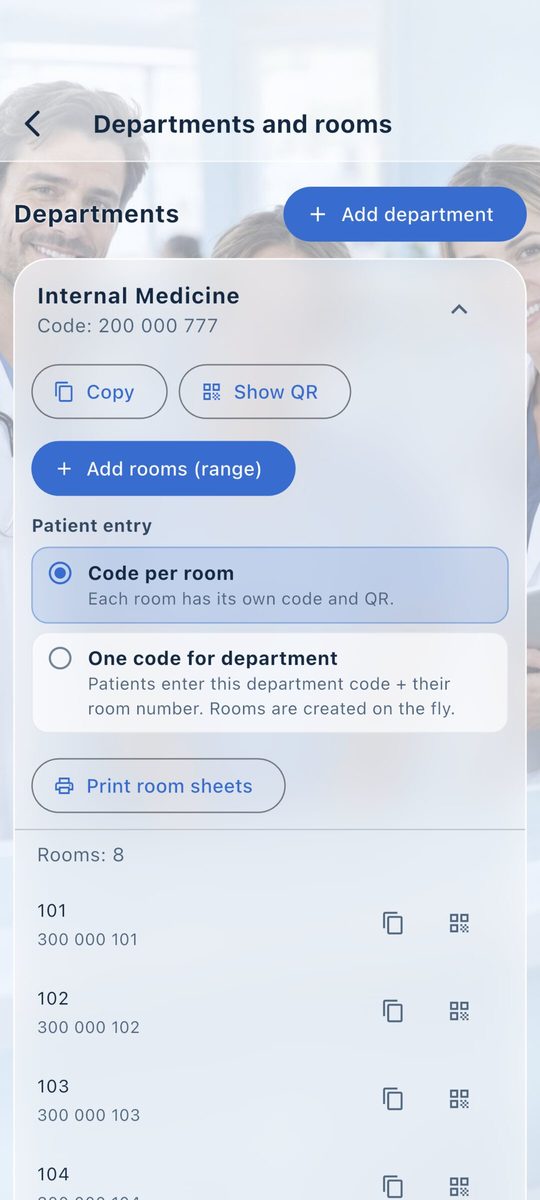
- Create the department and its rooms. Add a range of rooms and choose how patients reach the call screen: a code per room or one code for the whole department.
- Print the room sheets (or one department sheet) and put them at the beds. You use your own paper and printer.
- Invite the nurses. Show the invitation as a large QR code or share the link; staff install the app on their phones or use the web version on a computer at the nurse station.
- Decide who gets alerted if nobody accepts a call. The administrator sets up roles and the alert chain: a call nobody accepts moves on to the next people in the chain.
- Run test calls from every room together with the staff, on day and night shifts, and check that each call arrives and is heard on the phones and computers assigned to that department.
What to check during the week
- Every phone rings. On Android, the app has an alarm check: a test alarm plus warnings about alarm volume and battery saving. Test calls quickly show which phones need their settings changed.
- Nurses respond. They can accept a call (with Accept, or I'm coming on the alert screen), then mark that they are with the patient or hand the call over; when they go off shift, they can return the calls they accepted to the department.
- The chain works. Leave one test call unanswered and see who gets the alert next.
- Patients understand the sheet. Ask a few patients to scan the code and call: the call screen opens in the phone's browser, with no app to install and no name, e-mail or phone number to give.
After the week
Ask the nurses and patients what worked and what did not, and only then decide whether to add more departments. Questions about setup: team@hospitalalert.online.
Frequently asked questions
What does a hospital need to start?
An administrator with a phone or a computer, a printer and paper for the room sheets, and staff who will answer calls in the app on iPhone or Android or in the web version on a computer at the nurse station. Patients use their own phones and install nothing.
Does the administrator need an e-mail address to register?
No. The administrator picks the hospital in the app and sets up a login and password. A care home or clinic registers the same way; if it doesn't show up in search, just type in its name.
One QR code per room or one per department?
Both work. With a code per room, each room has its own code and QR sheet. With one code for the department, patients enter the department code and their room number, and rooms are added automatically as patients use them.
What if a patient cannot use a phone?
Hospital Alert won't help in that case. Keep the hospital's other ways of calling for help, and arrange regular rounds for patients who cannot call at all.
Sources
How this article was prepared
Written by the Hospital Alert team with the help of AI tools. Everything we say about the app was checked against the app itself; facts from outside sources are linked above. This article is general information, not medical advice. Found a mistake? Write to team@hospitalalert.online.