Hospital Alert step by step
QR code nurse call: how patients call a nurse from their phone
With a QR code nurse call, the patient scans a code at the bed and a nurse call button opens in the phone's browser — no app to install and no equipment to buy. Nurses get the alert on their phones and at the nurse station, and the patient sees each step.

In many wards the bedside call button is missing, broken, or simply out of reach. A QR code on the wall next to the bed turns the patient's own smartphone into a call button. Below is how this works in Hospital Alert, with real screens from the app, and, just as important, when it is not enough.
How a patient calls a nurse by QR code, step by step
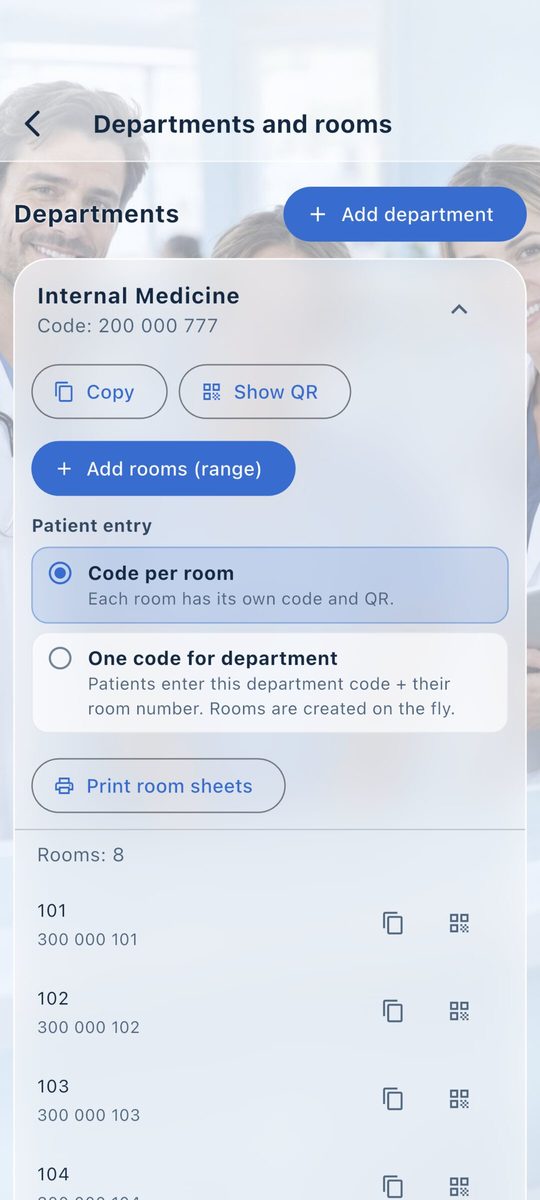
- A sheet with a QR code hangs at the bed. The hospital administrator prints it from the app: each room gets its own nine-digit code and QR code.
- The patient points the phone camera at the code. The phone offers to open a link, and the call screen opens in the browser. Nothing needs to be installed, and the patient is not asked for a name, e-mail or phone number — the room code is enough.
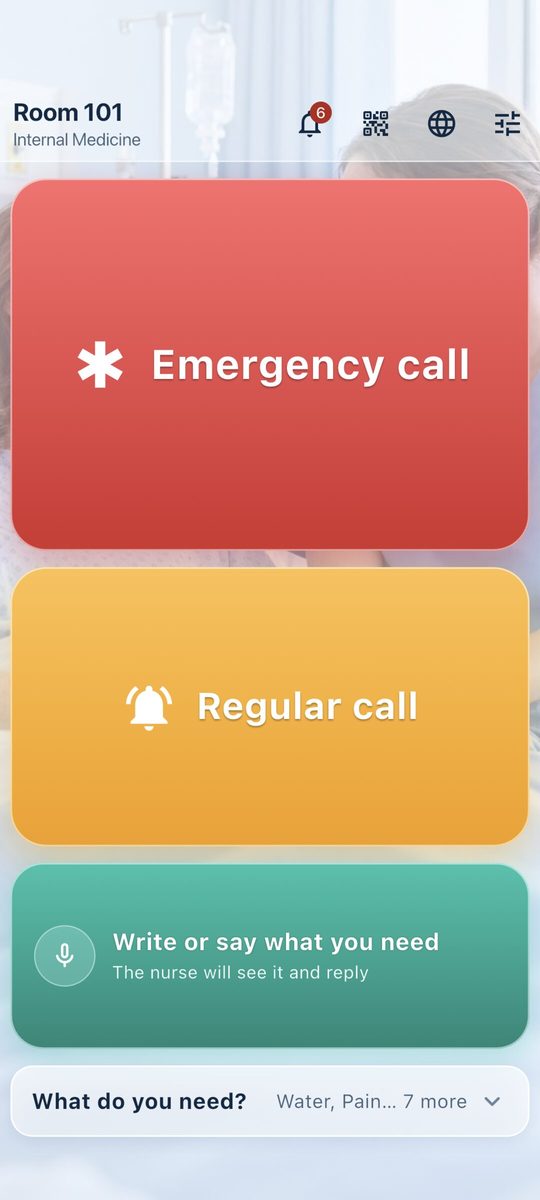
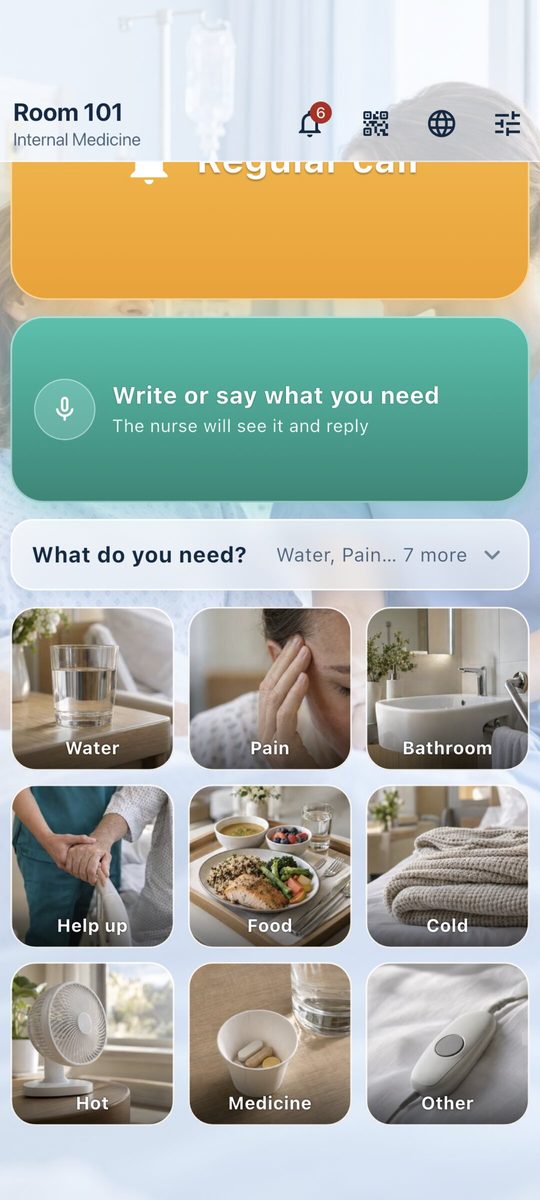
- The patient chooses how to call. The red button is an emergency call, the yellow one is a regular call. Below them is “Write or say what you need” and a menu of common needs with pictures: water, pain, bathroom, help getting up, food, cold, hot, medicine, other.
- The alert goes to the staff. Nurses get it on their phones and on the nurse station screen; emergency and regular calls sound different.
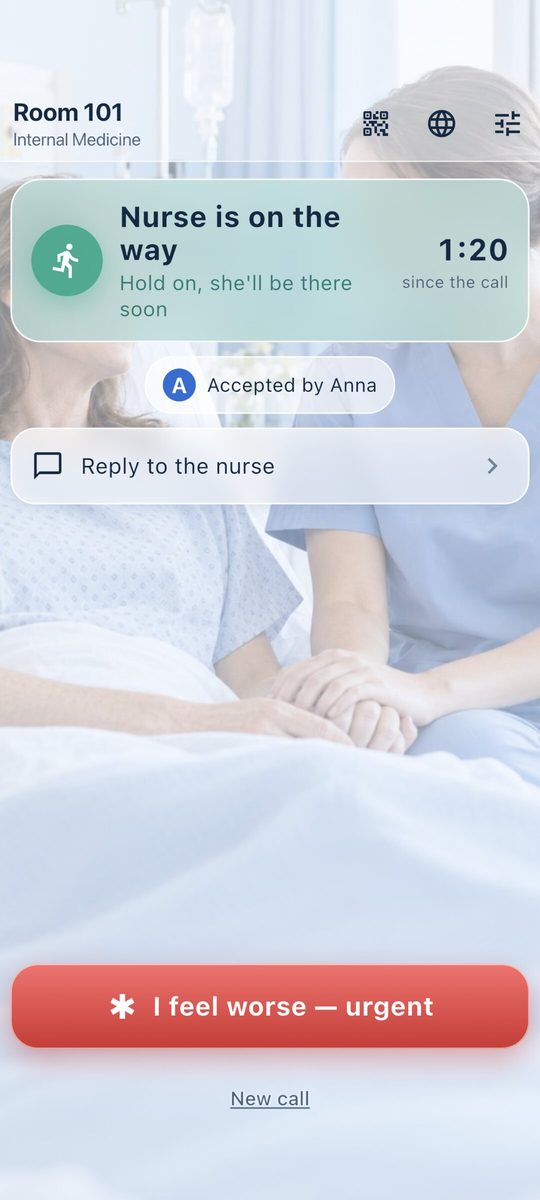
- The patient sees what happens next: the alert has been sent, it has been received, a nurse has accepted it (the patient sees the nurse's pseudonym — staff use pseudonyms in the app, not real names), the nurse is on the way, the nurse is with you. A timer shows how long ago the call was made.
While waiting, the patient can reply to the nurse in a short chat. If things get worse, the large “I feel worse — urgent” button sends an urgent alert to staff; the patient does not need to cancel the previous call. If the hospital has entered the nurse station phone number, the patient sees it while waiting.
What the nurse sees on the phone and at the nurse station
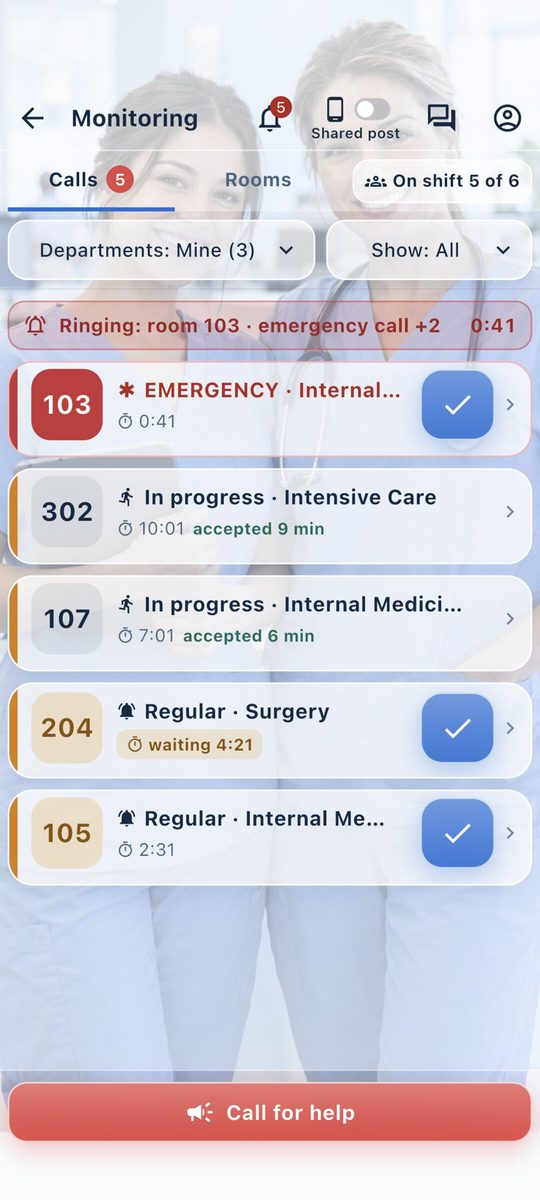
On the staff side every call appears with the room number, the department and whether it is an emergency. A nurse accepts the call — with Accept, or I'm coming on the alert screen — and then can mark I'm with the patient, or Can't go — hand over if they are busy; colleagues see who has taken the call, and the patient sees that another nurse is being looked for.
If nobody accepts the call, it automatically moves down the chain set by the hospital administrator — for example, to the head nurse or the on-call doctor. Who is on the chain and how long each step waits is up to the hospital.
How a nurse calls the on-call doctor
If a nurse needs a doctor or an extra pair of hands, they tap Call for help in the app and pick how urgent it is: Need help, Doctor urgently (the on-call doctor is needed now) or Critical — all hands. In the Also call row the nurse can add the on-call doctor, the head nurse, other hospital roles or all hospital staff. The hospital administrator sets who receives each level.
One code per room, or one per department
A hospital can choose between two ways to put codes in rooms:
- Code per room — every room has its own QR code, and the call arrives with the room already filled in. This is the simplest option for the patient.
- One code per department — a single sheet for the whole department; after scanning, the patient enters the room number. This suits departments where beds move often or rooms have not been set up yet.
Language and translation
The app interface is available in 19 languages; the patient switches the language with the language button at the top of the screen (on a narrow phone screen it is in the menu). Messages in the chat between the patient and the staff are translated automatically; in the browser version this is done by a third-party AI service, so do not write personal or medical details in the chat. This is machine translation: it helps with everyday requests (“I need water”, “please help me get up”), but it is not a medical interpreter — for conversations about diagnosis or treatment, follow your hospital's rules on interpreters.
What the patient does not have to share
To call, the patient does not register and does not give a name, e-mail or phone number: the call is linked to the room, not to a person. Staff appear under pseudonyms. Whatever the patient writes in the chat is stored so that the staff can read it. The details are in the privacy policy.
How to start in one department
- Register the hospital in the app (the administrator chooses the hospital and creates a login and password — no e-mail needed).
- Create a department and its rooms, choose “code per room” or “one code for department”.
- Print the room sheets and put them at the beds. A Call, Don't Fall sign above the sheet reminds patients to call before getting up.
- Invite the nurses with a link or QR code; they install the app on their phones.
- Make a test call from a room and check the devices assigned to receive this type of call from that department: the call arrives and the alert can be heard.
A practical tip: start with one department and run test calls together with the staff — this quickly shows which phones need their alert settings adjusted.
Frequently asked questions
Does the patient need to install an app?
No. Scanning the QR code at the bed opens the call screen in the phone's browser, so there is nothing to install and no account to create. Staff, on the other hand, use the Hospital Alert app or the web version on a computer.
Does calling a nurse by QR code need my name or phone number?
No. The patient does not register and does not give a name, e-mail or phone number: the room code is already in the link from the QR sheet, and the call is linked to the room, not to a person. Whatever the patient writes in the chat is stored so that staff can read it; the privacy policy has the details.
What happens if no nurse accepts the call?
The call automatically moves down the chain set by the hospital administrator, for example to the head nurse or the on-call doctor. The patient meanwhile sees the status and, if the hospital entered it, the nurse station phone number. If the patient feels worse, the I feel worse — urgent button sends an urgent alert to staff; there is no need to cancel the previous call.
How does the patient know the nurse is coming?
The patient's screen shows each step: the alert has been sent, it has been received, a nurse has accepted the call (with the pseudonym that nurse uses in the app), the nurse is on the way, the nurse is with you — and a timer since the call. If nobody responds for a while, the screen says No response yet and suggests calling the staff out loud or asking a neighbour.
Can a patient who speaks another language use it?
Yes. The interface is available in 19 languages and chat messages are translated automatically. In the browser version a third-party AI service does the translation, so it suits everyday requests; for conversations about diagnosis or treatment the hospital's rules on interpreters apply.
Can a QR code call take the place of the call button?
Not for every patient. It needs a smartphone, an internet connection and the strength to use them. Patients who are unconscious, very weak, without a phone or small children need another way to call, so keep the usual means of calling for help in the room.
Sources
How this article was prepared
Written by the Hospital Alert team with the help of AI tools. Everything we say about the app was checked against the app itself; facts from outside sources are linked above. This article is general information, not medical advice. Found a mistake? Write to team@hospitalalert.online.