Nurse call without wiring
Nurse call for care homes and nursing homes on a small budget
A care home or nursing home can set up nurse call on a small budget by matching the call method to each resident: buttons, pendants or sensors for those who cannot use a phone, regular checks for those who cannot call, and phone calls by QR code for those who can. Visitors can call the same way, and carers answer in a staff app.

A care home or a small clinic often has few staff on a shift, a tight budget and residents or patients with very different abilities, so one solution rarely fits everyone. This guide covers which way of calling realistically suits whom, what wireless systems in care homes look like, where a phone makes sense and how to build a mixed setup step by step.
Why a phone alone is not enough in a care home
Dementia affects memory, thinking and the ability to perform daily activities, according to the World Health Organization. A resident who cannot remember where the phone is, cannot unlock it or cannot read the screen will not call from it — however simple the call screen is.
Researchers who studied five residential care facilities in Norway point out that traditional nurse call systems rely on residents to summon help, while the needs of older residents are increasingly complicated by serious illness, dementia and other conditions (Dugstad et al., 2020). For many residents, a smartphone is simply not a realistic way to call, and planning has to start from there.
Falls, and why every resident needs a way to get help
The WHO calls patient falls the most frequent adverse events in hospitals. In a study of four US hospitals, units where patients used the call light more often had lower total and injurious fall rates (Tzeng et al., 2012). These are hospital data and an association, not proof of cause, but they are a strong reason not to leave anyone without a way to get help. For older people in residential care, the WHO advises tailoring fall prevention to health status, level of risk, care environment and staffing — the same logic applies to choosing how each person calls.
Who can call, and how: residents, visitors and staff
| Who | Realistic way to call | Keep in mind |
|---|---|---|
| Residents with dementia or severe frailty | A button or pendant if they can still press it; sensors (bed-exit, door) where a system offers them; regular checks | Review when the person's condition changes |
| Residents who cannot call at all | Regular checks and close observation by staff | No device replaces a person looking in |
| Residents who use a smartphone | Their own phone through a QR code at the bed, plus a button as a backup | The phone must be charged and within reach |
| Visitors and relatives | Their own phone through the QR code in the room | Useful when they notice that the resident needs help |
| Staff who need a colleague | A staff app, phone or radio | Agree who answers on each shift |
| Patients of a small clinic | Their own phone through a QR code; a button for those who cannot use it | Works for short stays and recovery rooms with able patients |
What wireless systems in care homes look like
In the five Norwegian facilities studied by Dugstad and colleagues, residents wore wristbands or pendants with a call function, the systems added sensors such as bed-exit, door and motion sensors, and staff received calls and sensor alerts on smartphones, where they could also call colleagues. A bedside alarm button was listed as optional for residents with dementia.
The study surveyed 98 care providers during the first year of use. The strongest facilitators were the expected outcomes — prompt responses and increased safety; the most common barriers, each reported by 37%, were lack of prior knowledge and finding the system difficult to learn. No features of the technology were identified as barriers, and training, practice and support from managers and colleagues helped. The practical lesson: budget staff time for training, not only devices.
Where calling from a phone makes sense
A phone channel works when the caller is awake, able and has a phone at hand: a carer who needs a second pair of hands, a relative sitting with a resident, a resident who uses a smartphone every day, or a clinic patient in a short stay or recovery room. In systems that support it, the caller can also say in a short message what is needed.
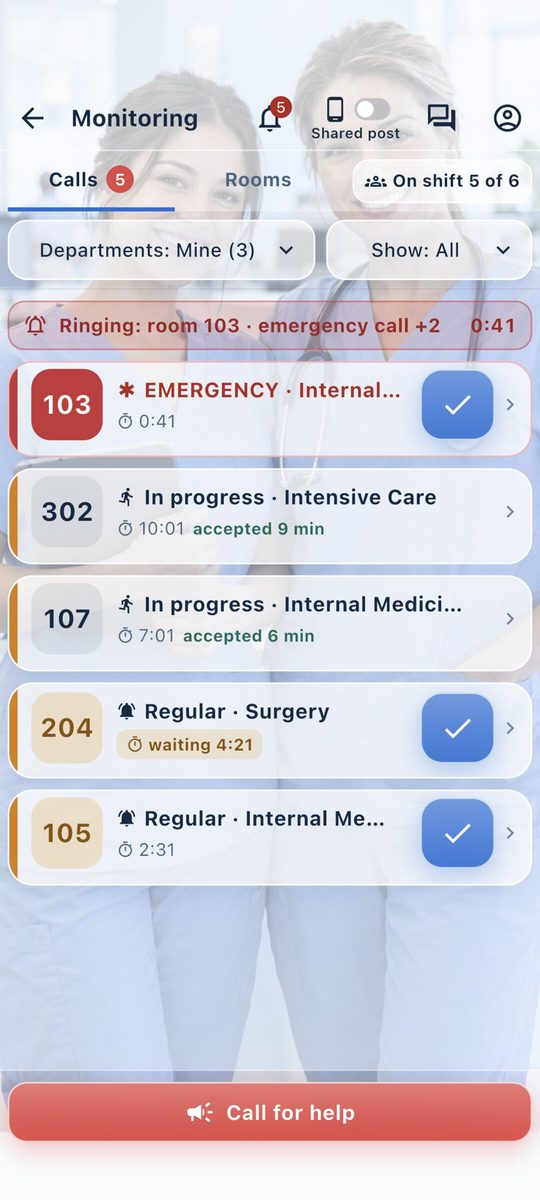
Where the money goes in a care home or nursing home
Prices depend on the country and the supplier, so compare the cost drivers rather than catalogue prices:
- Hardware: buttons, pendants, sensors, receivers or pagers, batteries and spare parts.
- Installation and coverage: cabling or radio coverage, network and Wi-Fi in every room.
- Software and phones: licences, integration, phones or other devices for staff.
- Staff time: training and practice, which the Norwegian study shows matter.
- Upkeep: charging, battery changes, repairs and regular test calls.
A common way to spend less is to put hardware only where it is needed and use phones for everyone who can. Such a mixed setup needs a clear routine so that no channel is forgotten.
What the rules say
Some countries set specific rules for call systems in care facilities. In Germany, DIN VDE 0834-1 covers call systems in hospitals, nursing homes and similar institutions. In the United States, healthcare facilities show compliance with the NFPA 99 code by looking for nurse call equipment listed to UL 1069, while UL 2560 covers emergency call systems for assisted living and independent living facilities (more in nurse call for assisted living). Other countries have their own codes. Where certified equipment is required, check whether a phone channel you add is itself certified; an uncertified app can only add a channel. Ask the authority that inspects your building first.
A mixed setup in six steps
- Sort residents or patients by how they can call: button, phone, or neither. Review the list when someone's condition changes.
- Cover those who cannot use a phone with buttons, pendants or a sensor-based system, and agree a schedule of checks for those who cannot call at all.
- Set up the phone channel: create rooms, print a QR sheet for each room (or one sheet for a whole unit, where the caller enters the room number) and install the staff app on the phones of those on shift.
- Decide what happens if nobody answers: the call should move on to the next person automatically — a senior nurse or the manager on duty.
- Run test calls from every room with the staff and check that the call reaches, and is heard on, the devices or receivers assigned to receive that type of call from that room's unit, including at night.
- Keep the old way of calling during a pilot and after a few weeks ask staff, residents and relatives what worked.
Frequently asked questions
Can residents with dementia call staff with a QR code?
It depends on the person. Dementia affects memory, thinking and the ability to perform daily activities, so a resident may not find, unlock or read a phone when help is needed. Plan a physical button, a sensor-based system or regular checks for them and treat a phone channel as an extra.
What is the lowest-cost way to set up nurse call in a care home?
There is no single answer without local prices. A common way to spend less is to buy hardware only where it is needed — buttons or sensors for residents who cannot use a phone — and use phones for staff, visitors and residents who can. Check local rules before relying on any uncertified channel.
Does a nursing home need a certified nurse call system?
It depends on the country and the type of home. In Germany DIN VDE 0834-1 covers call systems in hospitals, nursing homes and similar institutions. In the US healthcare facilities look for UL 1069 and assisted or independent living facilities for UL 2560. Ask the authority that inspects your building.
Can relatives call staff from their own phone during a visit?
Yes, if the home uses a QR-based system: the visitor scans the code at the bed and a call screen opens in the phone's browser, with no app to install. Make sure these calls reach the staff assigned to receive them from the room's unit and that the usual way of calling stays in the room.
Is Hospital Alert suitable for a small clinic?
For patients who can use their own phone, it can be: they call from a QR code at the bed, staff answer in the app on phones or a computer, and it is free today. Patients who cannot use a phone still need another way to call, and the app is not certified nurse call equipment.
Sources
- Dugstad et al. — Nursing staff's evaluation of facilitators and barriers during implementation of wireless nurse call systems in residential care facilities, BMC Health Services Research, 2020
- World Health Organization — Dementia fact sheet, 2026
- World Health Organization — Falls fact sheet, 2026
- World Health Organization — Patient safety fact sheet, 2023
- Tzeng et al. — The contribution of staff call light response time to fall and injurious fall rates: an exploratory study in four US hospitals, BMC Health Services Research, 2012
- UL Solutions — Nurse Call and Emergency Call Systems (UL 1069, UL 2560, NFPA 99), 2020
- DIN Media — DIN VDE 0834-1:2026-08, Call systems in hospitals, nursing homes and similar institutions
How this article was prepared
Written by the Hospital Alert team with the help of AI tools. Everything we say about the app was checked against the app itself; facts from outside sources are linked above. This article is general information, not medical advice. Found a mistake? Write to team@hospitalalert.online.