Running a ward
Nurse call station: what the master station shows and does
The nurse call station, or master station, is the console at the nurses' desk that lists every call by room, bed and priority, sounds a tone and, in audio systems, lets staff talk to the patient. Smaller duty stations and staff stations repeat calls in corridors and work rooms, and the system can pass calls to staff phones or pagers.

Every call a patient makes ends up somewhere staff can see it. In most hospitals that place is the nurse call station at the nurses' desk — also called the master station, the nurse call panel or the console. This guide explains what the station shows, how it differs from the smaller stations in corridors and rooms, and what to think about when the desk is empty. For the system as a whole, see what a nurse call system is and how it works.
Stations in a nurse call system
Two US federal specifications — from the Department of Defense and the Department of Veterans Affairs (VA) — describe the stations a nurse call system can have. Manufacturers' names differ, but the roles are the same:
| Station | Where | What it does |
|---|---|---|
| Master station | Nurses' desk | Lists all calls by room and priority, sounds a tone; in audio systems staff talk to the patient; can send text to pagers and phones and assign staff to beds |
| Duty station | Elsewhere on the unit, such as corridors and work rooms | Repeats calls with coloured lights and a tone, so staff away from the desk notice them; has a call button and a speaker and microphone |
| Staff station | Patient rooms and other rooms | Lets staff call a colleague; a call button, a lamp that confirms the call and a cancel button, sometimes with intercom |
| Staff emergency and code blue stations | Patient rooms, treatment areas | Let staff raise an emergency or call the resuscitation team |
| Patient station | Wall by the bed | Socket for the patient's cord set, a lamp that confirms the call and a reset button |
What the master station shows
The specifications are fairly precise about the screen:
- Order: calls appear by priority level first, then in the order they were placed (UFGS 27 52 24). Code calls come before emergencies, emergencies before patient calls.
- Where and how many: for its simple tone-and-light systems, the VA asks for a readout of ward, room and bed — its example is "2A201A" for Ward 2A, Room 201, Bed A — a separate display for each patient sharing a bedside station, and at least four calls on screen, with further calls stored by order and priority.
- Sound: each priority has its own tone and flash pattern; staff can mute the tone, but it comes back on automatically when another call arrives.
- Clearing: a call is not cleared from the desk. Under the VA specification every call stays on the master station until staff clear it at the station where it was made, so someone has to go to the patient.
More advanced audio-visual stations add text messages to pagers and wireless phones, the staff assigned to each patient and, where configured, staff status and location.
The problem of the empty desk
A station only helps if someone sees it. A study of nurse call systems in two large city hospitals found real benefits when unit secretaries took calls at the desk and screened them: fewer unnecessary interruptions for nurses, time saved, and nurses who could prepare before walking into the room. The same study also listed the problems: poor sound, not being able to locate the nurse, not being able to prioritise and confirm calls, and not being able to speak directly to patients and staff (Miller et al., 1997).
Those problems explain the rest of the design. Duty stations repeat calls along the corridor, and the master station can forward calls to the pagers and phones staff carry — see nurse pager or smartphone. A screen that shows why the patient is calling, not only the room, also lets whoever is at the desk send the right person.
What sits behind the station
The console is only the visible part. For audio-visual systems, the Defense specification requires a nurse call controller in each nursing unit that does not need regular rebooting, keeps basic call functions going if the facility's network fails, and is not a PC. It also asks for battery backup or an uninterruptible power supply for at least 15 minutes, and for the system to report failures of its own devices to a designated console. In the United States, nurse call equipment is typically listed to UL 1069 (UL Solutions, 2020). Rules differ by country: ask the authority that inspects your building which apply to you.
Questions to ask about your station
- Who watches it on each shift, including nights and breaks?
- Can staff away from the desk see and hear calls — on duty stations, pagers or phones?
- Does the screen show what the patient needs, or only the room?
- What happens to a call nobody answers, and after how long?
- Does the tone come back after it has been muted?
- Can calls be cleared only in the room?
A computer as a second station
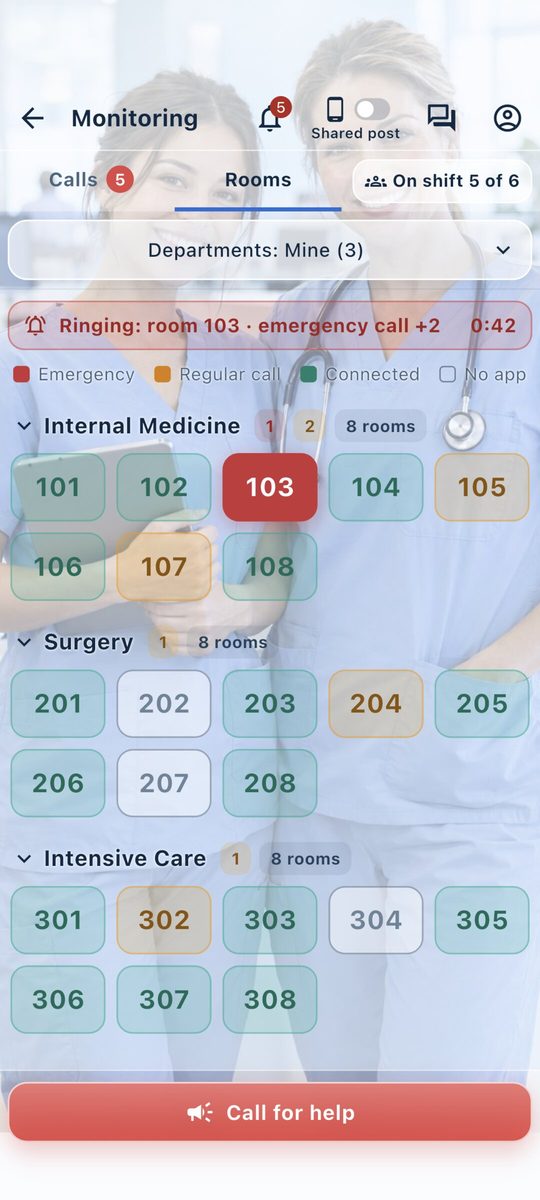
Some wards add a screen on an ordinary computer. Hospital Alert has a web version that runs in a browser at the nurses' desk, alongside the app on staff phones. The room panel shows every room as a grid, coloured by status — connected, regular call or emergency — with a call feed sorted by priority that updates on its own. A new call comes with sound; staff accept it, mark it done and can chat with the patient. Only staff on shift get alerts on their phones; if a call is not accepted, it moves up the chain the hospital has set up, and if nobody is reachable it stays visible on the nurse station screen. See the one-ward pilot checklist to try it.
Frequently asked questions
What is the difference between a master station and a duty station?
The master station is the main console at the nurses' desk: it lists all calls, lets staff talk to rooms in audio systems and, in larger systems, assigns staff to beds. A duty station is a smaller unit in a corridor or work room that repeats the calls with lights and a tone and has a speaker and microphone.
What does a nurse call panel show?
At least the room and bed of each call and its type or priority. A US federal specification asks for a readout such as ward, room and bed, at least four calls on screen with the rest stored in order, and the most urgent call first. Newer screens can also show staff status and location.
Can a computer be used as a nurse call station?
As an extra screen, yes: the US Defense specification mentions PCs linked to the master station. But under the same specification a PC may not serve as the nurse call controller, and basic call functions must keep working if the facility network fails. A browser-based app on a computer is an extra screen, not the core of a certified system.
What happens if nobody is at the nurse call station?
The call keeps showing and sounding, but it may not reach anyone. That is why systems pass calls to duty stations in corridors and to staff pagers or phones, and why some send a call nobody answers to back-up staff after a set time.
Sources
- U.S. Department of Defense (USACE / NAVFAC / AFCEC) — UFGS 27 52 24, Nurse Call System, November 2020
- U.S. Department of Veterans Affairs — Specification 27 52 23, Nurse Call and Code Blue Systems, December 2020
- Miller et al. — Nurse call systems: impact on nursing performance, Journal of Nursing Care Quality, 1997
- UL Solutions — Nurse Call and Emergency Call Systems (UL 1069, UL 2560, NFPA 99), 2020
How this article was prepared
Written by the Hospital Alert team with the help of AI tools. Everything we say about the app was checked against the app itself; facts from outside sources are linked above. This article is general information, not medical advice. Found a mistake? Write to team@hospitalalert.online.