Running a ward
Nurse pager or smartphone: how nurse calls reach staff
Nurses away from the desk get calls on a pager, a wireless phone, a smartphone or a smartwatch. A pager shows the room and the call type; a smartphone can also show why the patient is calling, let the nurse accept or pass the call on and talk back. In studies, sending calls to staff phones shortened the wait for patients.

Nurses spend most of a shift in patients' rooms, not at the desk. A call that shows only at the nurse station waits until someone walks past it. This is why nurse call systems send calls to devices staff carry: pagers, wireless phones, smartphones and, more recently, smartwatches. This guide compares them, sums up what research has measured and lists what to check before you move calls onto any of them. Hands-free badges are another option; we cover them in Vocera badge alternatives. For the console at the desk itself, see what the nurse call station shows.
Why calls need to follow the nurse
The problem is old. A study of nurse call systems in two large hospitals, published in 1997, listed the inability to locate the nurse among the main problems, along with being unable to prioritise and confirm calls or speak directly to patients (Miller et al., 1997). A nurse in room 12 cannot see a light at the desk or hear a tone at the other end of the corridor.
Today's US federal specifications build the answer into the system. The Defense specification asks for patient calls to be routed to any annunciator or personal device anywhere in the facility, by location, room assignment or priority, and for text messages to pagers, wireless phone displays and hands-free devices (UFGS 27 52 24).
What a paging system has to do
The Veterans Affairs (VA) specification is the most detailed about paging. Where pagers are approved, the system must:
- Send the room number and the call type (a condition code for the priority), plus optional text, to the staff the shift supervisor chooses.
- Page the staff member assigned to the room automatically, with any bed assignable to any pager or group of pagers.
- Page an alternate when the primary staff member cannot respond within a set time.
- Send code blue calls to a predetermined group at the press of one button, with the room and "Code Blue" in plain English on the pager.
The VA does not accept just any pager: low-power unlicensed pagers and transmitters (FCC Part 15) are not allowed for "safety of life" functions. Two-way personal wireless communicators are allowed only with security requirements and a training programme for the staff who use them (VA 27 52 23).
Pager, wireless phone, smartphone, smartwatch
| Device | What the nurse gets | Strengths | Watch for |
|---|---|---|---|
| Pager | A short message: room, call type, maybe a line of text | Simple, a single-purpose device | One-way only; the VA specification uses a separate device for two-way talk |
| Wireless phone (on the hospital's phone system) | Call details on the screen; can talk to the room or the desk | Two-way voice; can be linked to the nurse call system | Integration work; one more device to carry and charge |
| Smartphone with a nurse call app | Room, priority, often the reason for the call; buttons to accept or pass on; chat or voice | The nurse knows what is needed before walking over; replies and status in one place | Wi-Fi or mobile coverage in every room, battery, sound settings, alarm load |
| Smartwatch | A vibration and a short notice on the wrist | Hands stay free; hard to miss | Small screen; still needs a phone or network behind it |
Pager or smartphone, criterion by criterion
| Criterion | Pager | Smartphone app |
|---|---|---|
| What the nurse learns | A short text — from a nurse call system, for example the room and type of call; a numeric page may show only a number to call back | The room and type of call, and in some apps the reason or a short message |
| Replying | One-way: to reply or ask a question, the nurse has to find a phone | Two-way: in apps built for nurse calls, accept, reply or hand the call to a colleague from the same screen |
| If Wi-Fi fails | Does not rely on the hospital's Wi-Fi; NHS trusts in England were allowed to keep pagers for exactly this case | Needs Wi-Fi or mobile coverage; no network, no alert |
| Cost and supply | In the UK in 2019, one provider was left and a single device could cost up to £400 | Phones the hospital buys or staff already own, plus the app; Hospital Alert is free for hospitals today |
| Interruptions | Every page interrupts, urgent or not | More messages get sent because it is easy; urgency can be misread |
| Record of messages | Limited evidence trail, according to the UK government | Depends on the app: ask what it stores and for how long |
| Device care | A single-purpose device | Charging, sound settings and updates on every phone |
Where the pager still has the edge: it does one job and does not depend on the hospital's Wi-Fi. When the UK Department of Health and Social Care ordered pagers out of the NHS for non-emergency use in 2019, it still let trusts keep some for emergencies, such as when Wi-Fi fails or other forms of communication are unavailable. The same announcement, about pagers used for communication between NHS staff, names the weak side: pagers only offer one-way communication, and the person paged does not know who is contacting them, why or how urgently. The NHS was then using around 130,000 pagers at an annual cost of £6.6 million, and most mobile phone companies had stopped supporting them.
Smartphones bring their own problems. In a study on general medicine wards in Toronto, staff found smartphones more efficient than pagers, but once messages became easy to send, clinicians reported more interruptions, and doctors and nurses disagreed about what counted as urgent (Wu et al., 2011).
What research shows
- Taiwan, smartphone nurse call (Chuang et al., 2015). After a hospital linked its nurse call to a cloud system and smartphones, the time for a patient to contact the nurse responsible fell from almost four minutes to a few seconds, and the time for pharmacists to locate a nurse fell from 4.2 to 1.8 minutes.
- Taiwan, smart patient care system (Wen et al., 2022). On a ward where calls went straight to nurses' phones with the purpose of each alarm, average response time was about one minute, against about two and a half minutes on wards with the traditional system. Nurses rated being able to talk to the patient immediately by phone as the most helpful feature, and 31% of alarms were handled because nurses got them on their phones.
- Smartwatches in a simulated nursing home (Ali & Li, 2019). Nursing assistants working with a prototype smartwatch system responded 40% faster to calls from bedrooms and 58% faster to calls from bathrooms, and reported about half the workload. This was a simulation, not a working care home.
The reason for the call matters as much as the speed. In a scenario-based study, Norwegian nurses said that not knowing why a patient was calling was stressful when they had to choose between that patient and the one in front of them; the authors conclude that knowing the reason helps nurses decide more accurately (Klemets & Toussaint, 2016).
The catch: more devices, more alarms
Every call that reaches a phone is also a sound in someone's pocket. Healthcare staff are typically exposed to hundreds of alarms per shift, possibly more than 1,000, which can lead to alarm fatigue — slower or weaker responses to alarms. Clinical-grade smartphones that receive nurse calls are now carried by clinical staff, and quieter ways of delivering those calls are being studied (Howell & Knight, 2024). Before switching, decide which calls go to whom, which sound each type gets, and who is backup when a phone does not answer.
Checklist before you move calls to phones
- Coverage: test the signal in every room, bathroom and stairwell, not just the corridor.
- Who gets what: route by room assignment and priority; emergencies to more than one person.
- Unanswered calls: agree who is next if nobody accepts.
- Sound settings: silent mode, do-not-disturb and battery saving can stop alerts — check each phone.
- Charging and handover: phones charged at the start of each shift; calls handed back when a nurse goes off shift.
- Fallback: decide how calls reach staff if the network or a phone fails — for example the nurse station screen, or corridor lights where you have them.
Where Hospital Alert fits
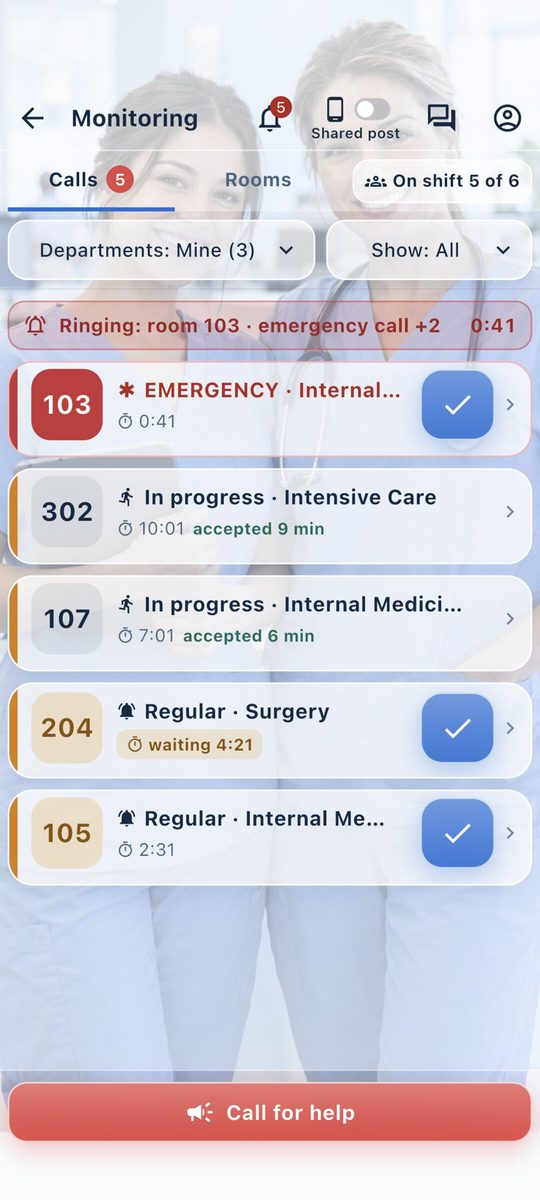
Hospital Alert is a phone-first approach: patients call from their own phones by scanning a QR code, and staff get the call in an app on their phones and in the web version at the nurse station — there is no pager network. A full-screen alarm wakes the phone even when the screen is off or locked, each alert type can have its own ringtone, and only staff marked "on shift" receive calls. Nurses can accept a call (with Accept, or I'm coming on the alert screen), then mark that they are with the patient or hand it over, and colleagues can be called for help from the same screen. If nobody accepts a call, it moves up the chain the hospital has set up. On Android, an alarm check plays a test alarm and warns about alarm volume and battery saving. To test it in one ward, see the pilot checklist; for options without wiring, see four wireless nurse call options.
Frequently asked questions
Do nurses still use pagers?
Some hospitals do. US federal nurse call specifications from 2020 still describe paging interfaces alongside wireless phones and other personal devices. In many hospitals clinical staff now carry smartphones that receive nurse calls. What matters is that every call reaches someone who can act on it.
What is a nurse paging system?
It is the part of a nurse call system that sends calls as short messages to devices staff carry. In the VA specification the message shows the room number and a condition code for the priority, and the system can page the nurse assigned to the room, an alternate, or a whole code team.
Can nurse calls go to a smartphone?
Yes. The US Defense specification asks for calls to be routable to wireless phones and other personal devices, and some apps take calls straight from patients. Before relying on phones, check radio coverage in every room, battery life, sound and do-not-disturb settings, and what happens if the phone does not ring.
Do nurse call alerts come through on a locked phone?
In Hospital Alert, yes: alerts reach staff phones when the screen is off or locked. On iPhone they are sent as time-sensitive notifications, which a Focus lets through when its Time Sensitive Notifications setting is turned on. Delivery still depends on the network and on phone settings, so check that notifications are allowed for the app; phones marked off shift get no calls.
What happens if the nurse does not answer the page?
In a well-set-up system the call does not just wait. The VA specification requires the system to page an alternate staff member when the primary one cannot respond within a set time; other systems pass an unanswered call up a chain the hospital defines.
Do smartwatches help nurses answer calls faster?
One simulation study in a mock nursing home found that a smartwatch system cut staff response time to call lights by 40% from bedrooms and 58% from bathrooms. It was a prototype in a simulated setting, so real wards need their own test.
Sources
- U.S. Department of Veterans Affairs — Specification 27 52 23, Nurse Call and Code Blue Systems, December 2020
- U.S. Department of Defense (USACE / NAVFAC / AFCEC) — UFGS 27 52 24, Nurse Call System, November 2020
- Miller et al. — Nurse call systems: impact on nursing performance, Journal of Nursing Care Quality, 1997
- Chuang et al. — Application of a smartphone nurse call system for nursing care, Telemedicine and e-Health, 2015
- Wen et al. — Implementation and experience of an innovative smart patient care system: a cross-sectional study, BMC Health Services Research, 2022
- Ali & Li — Evaluating a smartwatch notification system in a simulated nursing home, International Journal of Older People Nursing, 2019
- Howell & Knight — Quieter Nurse Call System to Reduce Alarm Noise in Hospitals, Studies in Health Technology and Informatics, 2024
- Department of Health and Social Care (GOV.UK) — Health and Social Care Secretary bans pagers from the NHS, 23 February 2019
- Wu et al. — An Evaluation of the Use of Smartphones to Communicate Between Clinicians: A Mixed-Methods Study, Journal of Medical Internet Research, 2011
- Klemets & Toussaint — Does revealing contextual knowledge of the patient's intention help nurses' handling of nurse calls?, International Journal of Medical Informatics, 2016
- Apple Support — Allow or silence notifications for a Focus on iPhone
How this article was prepared
Written by the Hospital Alert team with the help of AI tools. Everything we say about the app was checked against the app itself; facts from outside sources are linked above. This article is general information, not medical advice. Found a mistake? Write to team@hospitalalert.online.