Running a ward
Nurse call button types: which one suits which patient
A nurse call button is not one device but a family: a push-button on a cord, a pillow speaker with TV and light controls, a light-touch pad, a squeeze bulb, a breath switch, controls built into the bed rail, a pull cord in the bathroom and wearable pendants. The right one is the one this patient can reach and use.

"Press the button if you need anything" assumes the patient can find the button, understand it and press it. Many cannot: their hands are weak, their eyesight is poor, they are confused, or the button has slipped off the bed. Nurse call systems therefore offer several kinds of call buttons. This guide explains each type, who it suits and what to check, so that a nurse or ward manager can match the button to the patient.
Why the type of button matters
For patients, the button is their way to start a conversation with a nurse and to get help "right now", as intensive care patients put it in one interview study (Lasiter, 2014). When the button fails them, they lose that way of asking for help. Studies of older inpatients found many who could not use their call bell because it was out of reach or because they did not understand it (Duffy et al., 2005; Chadwick & Hearn, 2013).
Some of these problems are about routine — putting the button back in reach. Others are about the device: a standard button may be the wrong tool for this patient.
Types of nurse call buttons
Two US federal specifications — from the Department of Defense and the Department of Veterans Affairs — describe the devices a patient or staff member can use to place a call. Manufacturers use their own names, but the types are much the same.
| Device | How it works | Suits | Watch for |
|---|---|---|---|
| Push-button cord set | A button on a cord that plugs into the patient station on the wall | Most patients who can grip and press | Ends up out of reach after care or a bed change |
| Pillow speaker (handset) | A handset with the call button plus volume, TV channel and room and reading light controls, often with a speaker | Patients who stay in bed for long periods | More buttons to confuse; the call button must stand out |
| Light-pressure ("geriatric") button | A switch in a soft jacket that needs only a light touch | Weak, stiff or painful hands | Still has to be within reach of the hand that works |
| Squeeze bulb | A soft bulb; squeezing it closes a switch in the plug | Patients who can grip but not press a small button | Needs a hand that can close around it |
| Breath call switch | An air-pressure switch on an adjustable arm, operated by breath through a replaceable straw | Patients who cannot use their hands | Needs to be positioned for each patient; straws must be replaced |
| Bed rail controls | Call buttons built into the hospital bed, connected through a socket on the wall | Patients in beds that have them | The bed must be plugged in; the system should alarm if the cable is pulled |
| Wall button at the patient station | In the VA specification, a call button, a call-answered button and a socket for the pillow speaker | Staff and patients who can reach the wall | Out of reach for a patient lying down |
| Bathroom pull cord | A cord with a pendant at the end that places an emergency call | Toilets and showers | Must hang free; see nurse call pull cords |
| Tamper-proof push-button | A button with no cord | Behavioural health units, where the Defense specification prohibits pull cords | Fixed position |
| Wearable pendant (wireless systems) | A call button the resident wears, which calls by radio | Residents who walk about, for example in care homes | Battery and radio coverage; must actually be worn |
The specifications add practical requirements: cords long enough for the patient to reach, washable and sterilisable, safe near medical gases, with a wall bracket to hold the cord set when not in use (UFGS 27 52 24). The breath switch must be suitable for oxygen-enriched air and comes with spare straws. Wearable call buttons were part of the wireless systems that five Norwegian care homes introduced, together with sensors for residents who cannot call (Dugstad et al., 2020).
What the button cannot tell the nurse
Most bedside buttons send one signal: this bed needs someone. Some call stations can have a second button for a priority call, and audio systems let the nurse ask over the speaker. Otherwise the nurse learns what the patient needs only on arrival.
Two more safeguards are built into the specifications. A call stays on until staff clear it in the room, so pressing the button again does not quietly cancel it (see how call priorities work). And the system raises a call if a cord set or a bed cable is unplugged, so a loose cord shows up at the nurse station instead of leaving the patient without a working button.
Choosing a button for one patient
- Can they reach it? Clip the cord where the patient can reach it; check after every transfer.
- Can they press it? If not, try a light-pressure button, a squeeze bulb or a breath switch.
- Can they see and recognise it? On a pillow speaker, show them which button calls the nurse and let them try once.
- Do they understand what it is for? If they cannot, a button is not enough: tell the shift, move them closer to the station or check on them more often.
- Do they leave the bed? A pendant or a bathroom pull cord matters more than a bedside button for residents who walk about.
For what happens once the button is pressed, see what happens when you press the hospital call bell; for the habits that keep the button in reach and get it answered, see call lights in nursing.
The patient's own phone as a call button
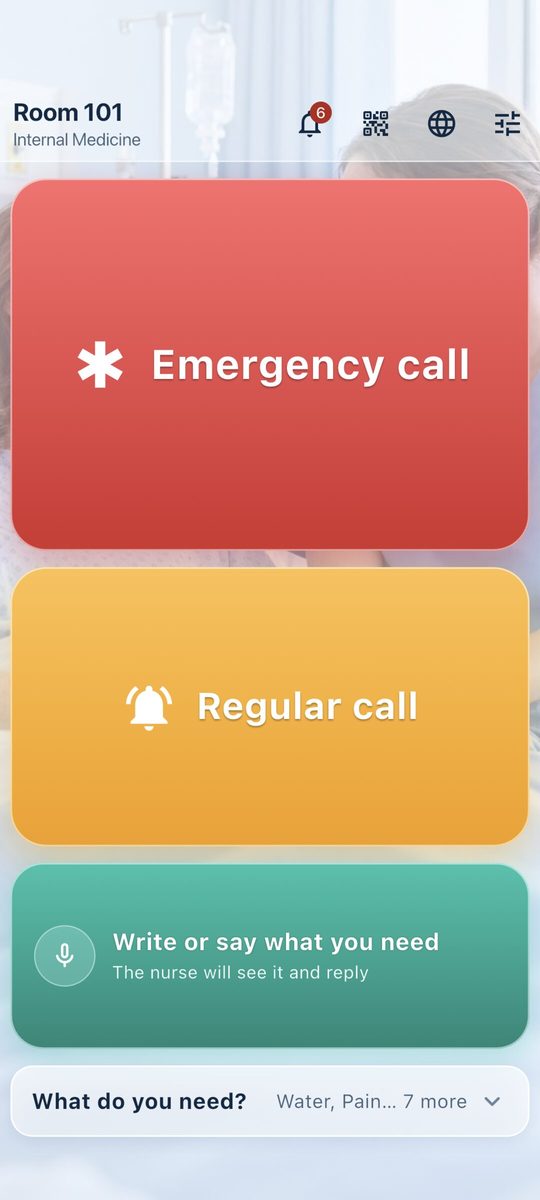
For patients who use a smartphone, the phone can be one more call button. With Hospital Alert the patient scans the QR code at the bed and a call screen opens in the browser, with nothing to install: a large red emergency button, a yellow regular call button, pictures of common needs and a field to write or say what they need. One tap sends a regular call, three taps an urgent one, and holding the button sends a critical call; a short cancel window protects against accidental presses. There is a calm mode without sirens and a pictogram-only mode. The nurse sees the reason before walking over. For a test in one ward, see the pilot checklist.
Frequently asked questions
What is the nurse call button called?
Names vary: call button, call bell, call light, call cord or pillow speaker when the button sits in a handset that also controls the TV and lights. Technical specifications call the corded versions cord sets, and the wall unit they plug into a patient station.
What if a patient cannot press the nurse call button?
There are switches for weak or stiff hands: a light-pressure button in a soft jacket, a squeeze bulb, or a breath switch on an adjustable arm, worked through a straw. If a patient cannot use any switch, the ward needs closer observation, not just a different button.
Is the call button on the hospital bed the same as the one on the cord?
It sends a call to the same system. Hospital beds can have call controls in the side rails, and the bed connects to the nurse call system through a socket on the wall. The specification for that socket requires the system to supervise the connection and show calls from the bed rails.
Can a smartphone be a nurse call button?
For some patients, yes: apps such as Hospital Alert let the patient call from their own phone by scanning a QR code at the bed. It only works for patients who have a phone and can use it, so it adds to the bedside button rather than standing in for it.
Sources
- U.S. Department of Defense (USACE / NAVFAC / AFCEC) — UFGS 27 52 24, Nurse Call System, November 2020
- U.S. Department of Veterans Affairs — Specification 27 52 23, Nurse Call and Code Blue Systems, December 2020
- Duffy et al. — Ability of hospitalized older adults to use their call bell: a pilot study in a tertiary care teaching hospital, Aging Clinical and Experimental Research, 2005
- Chadwick & Hearn — A cry for help: time to re-think the patient call bell in an ageing population, British Journal of Hospital Medicine, 2013
- Lasiter — "The button": initiating the patient-nurse interaction, Clinical Nursing Research, 2014
- Dugstad et al. — Nursing staff's evaluation of facilitators and barriers during implementation of wireless nurse call systems in residential care facilities, BMC Health Services Research, 2020
How this article was prepared
Written by the Hospital Alert team with the help of AI tools. Everything we say about the app was checked against the app itself; facts from outside sources are linked above. This article is general information, not medical advice. Found a mistake? Write to team@hospitalalert.online.